Scheduling apps for a 12-person motel team cost $30 to $120 a month, and one page lists an overtime alert

Homebase’s pricing page gives a one-location team up to 10 employees for free, and the eleventh person moves you to the $30 Essentials plan [1]. For a motel with 12 people on the rota, that one line matters more than any feature list: the free tier is gone, and every app in this post costs money.
The money at stake is overtime. Federal law pays every hour past 40 in a workweek at not less than one and one-half times the regular rate [2]. At the $16.86 median hourly wage for desk clerks in May 2025 [3], the extra half alone is $8.43 an hour. A schedule kept by text message is how those hours slip through.
We read the pricing pages of Homebase, When I Work, Deputy, Connecteam and 7shifts on Oct 30, 2026, priced each plan for 12 people at one location, billed monthly, and looked for three lines: shift swaps, a time clock and an overtime alert. Motel4 publishes this post. We sell an AI phone receptionist, and none of these apps is ours.
Prices, checked Oct 30, 2026
Each row is the vendor’s own published price for 12 users at one location, billed monthly, in U.S. dollars, with the three features as the pricing page lists them.
| App and plan | Price for 12 staff | How it is priced | Shift swaps | Time clock | Overtime alert | Source |
|---|---|---|---|---|---|---|
| Homebase Basic | Does not fit: free for 1 location, up to 10 employees | Flat per location | No | Yes, on tablets and computers | No | [1] |
| Homebase Essentials | $30 a month ($24 billed annually) | Flat per location, unlimited employees | Yes: trade, cover and claim open shifts | Yes, adds the mobile clock with location | No | [1] |
| Homebase Plus | $70 a month | Flat per location | Yes | Yes | No | [1] |
| Homebase All-in-One | $120 a month ($96 billed annually) | Flat per location | Yes | Yes | Yes: alerts when employees approach or reach overtime | [1] |
| When I Work Essentials | $30 a month (12 x $2.50) | Per user | Yes: OpenShifts and shift swapping | FAQ says every plan includes time and attendance | Not listed | [4] |
| When I Work Pro | $60 a month (12 x $5) | Per user | Yes | Same | Not listed | [4] |
| Deputy Lite | $60 a month (12 x $5), $30 minimum | Per user, USD before tax | Yes: shift swap and find replacement | Yes, basic time clocking | Not listed | [5] |
| Deputy Core | $78 a month (12 x $6.50) | Per user, USD before tax | Yes | Yes, adds biometrics | Not listed | [5] |
| Connecteam Small Business Plan | Does not fit: free for up to 10 users | Free | Yes | Yes | Not listed | [6] |
| Connecteam Operations Basic | $35 a month ($29 billed yearly) | Flat for the first 30 users | No: shift replacements start at Advanced | Yes, with GPS | Not listed | [6] |
| Connecteam Operations Advanced | $59 a month ($49 billed yearly) | Flat for the first 30 users | Yes | Yes | Not listed | [6] |
7shifts is not in the table. Its pricing page loads the dollar figures with a script; the page text we fetched on Oct 30 shows a free Comp plan and a 14-day trial of The Works, and the site calls itself a restaurant platform [7]. If your motel runs a restaurant, open the page in a browser and add its row.
Shift swaps come cheap, the overtime alert does not
Shift swaps sit in the cheapest paid plan at three of the four vendors. Homebase Essentials lets employees trade, cover and claim open shifts [1]; When I Work Essentials lists OpenShifts and shift swapping [4]; Deputy Lite includes shift swap and find replacement [5].
Connecteam is the exception. Shift replacements start at Operations Advanced, $59 a month, while the $35 Basic plan stops at open shifts [6].
A time clock is on every paid plan we read. Homebase’s free Basic plan clocks people in on tablets and computers, and Essentials adds the mobile clock with location [1]. Deputy Lite calls it basic time clocking [5]. Connecteam Basic clocks in and out with GPS [6]. When I Work’s FAQ says every plan includes time and attendance software [4].
The overtime alert is the line that splits the pack. Only Homebase’s pricing page lists one, under Labor Cost Management on the $120 All-in-One plan: alerts when employees approach or reach overtime [1]. The Essentials plan lets you customize overtime and break preferences, which sets the rule but does not promise the warning [1].
When I Work, Deputy and Connecteam do not list an overtime alert on their pricing pages [4] [5] [6]. That does not mean the apps lack one. It means you have to ask, and get the answer in writing, before you pick a plan on price alone.
Flat prices beat per-user prices once the team passes 12
At exactly 12 people, When I Work’s $2.50 per user and Homebase’s flat $30 cost the same [4] [1]. Add a thirteenth part-timer and When I Work costs more; at 20 users it is $50 against Homebase’s unchanged $30 [4] [1]. Per-user pricing favors a team that shrinks in winter, because you pay only for active seats.
Deputy’s per-user price comes with a floor. Monthly Lite, Core and Pro invoices carry a $30 minimum spend since September 1, 2025, so a team of four pays the same $30 as a team of six [5]. At 12 users Lite is $60, and every seat you add costs $5 [5].
Connecteam charges a flat price for the first 30 users, then $1.0 a month for each extra user on Basic and $3.0 on Advanced, billed monthly [6]. Yearly billing takes about 18% off, which turns Advanced from $59 into $49 a month [6]. The bill is the same at 12 people and at 30.
Homebase sells the same flat plans at $24 and $96 a month on annual billing, against $30 and $120 billed monthly [1]. Over a year that is $288 against $360 for Essentials, a saving worth taking only once you know the app will stick [1].
If the owner is also the night clerk, the phone strategies for a solo-run motel cover the hours nobody is scheduled for.
One overtime shift a week costs about $292 a month in premium alone
The example below prices the extra half of time-and-a-half, the part of overtime a better schedule can avoid. The rate comes from the statute [2], the wage from the BLS May 2025 wage table for desk clerks [3], and the eight hours and the 4.33 weeks are our assumptions.
The premium alone is about $292 a month, or about $3,504 a year, before the payroll taxes on it. That is more than twice the $120 Homebase All-in-One plan, the only one in the table whose pricing page promises an overtime warning [1], and nearly ten times the $30 Essentials plan.
The straight-time wage for that shift, $134.88 at the median rate [3], is money you would have paid someone anyway. Only the premium is waste, and only when a clerk who was still under 40 hours could have taken the shift instead [2]. Our older post on front desk staffing alternatives for small hotels covers the case where nobody can.
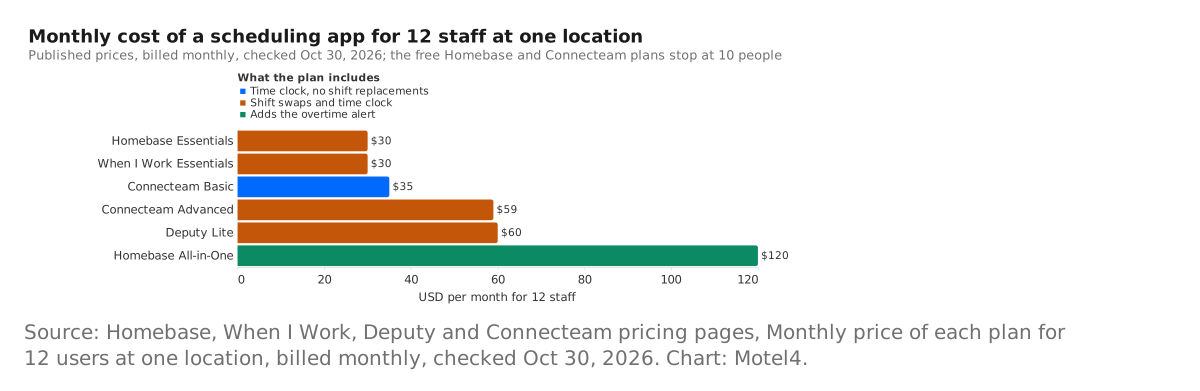
The chart lines up the cheapest plan that fits 12 people at each vendor, plus Connecteam Advanced for the swap feature and Homebase All-in-One for the alert. Five of the six bars sit at or between $30 and $60, and only Homebase All-in-One at $120 sits above them [1] [4] [5] [6].
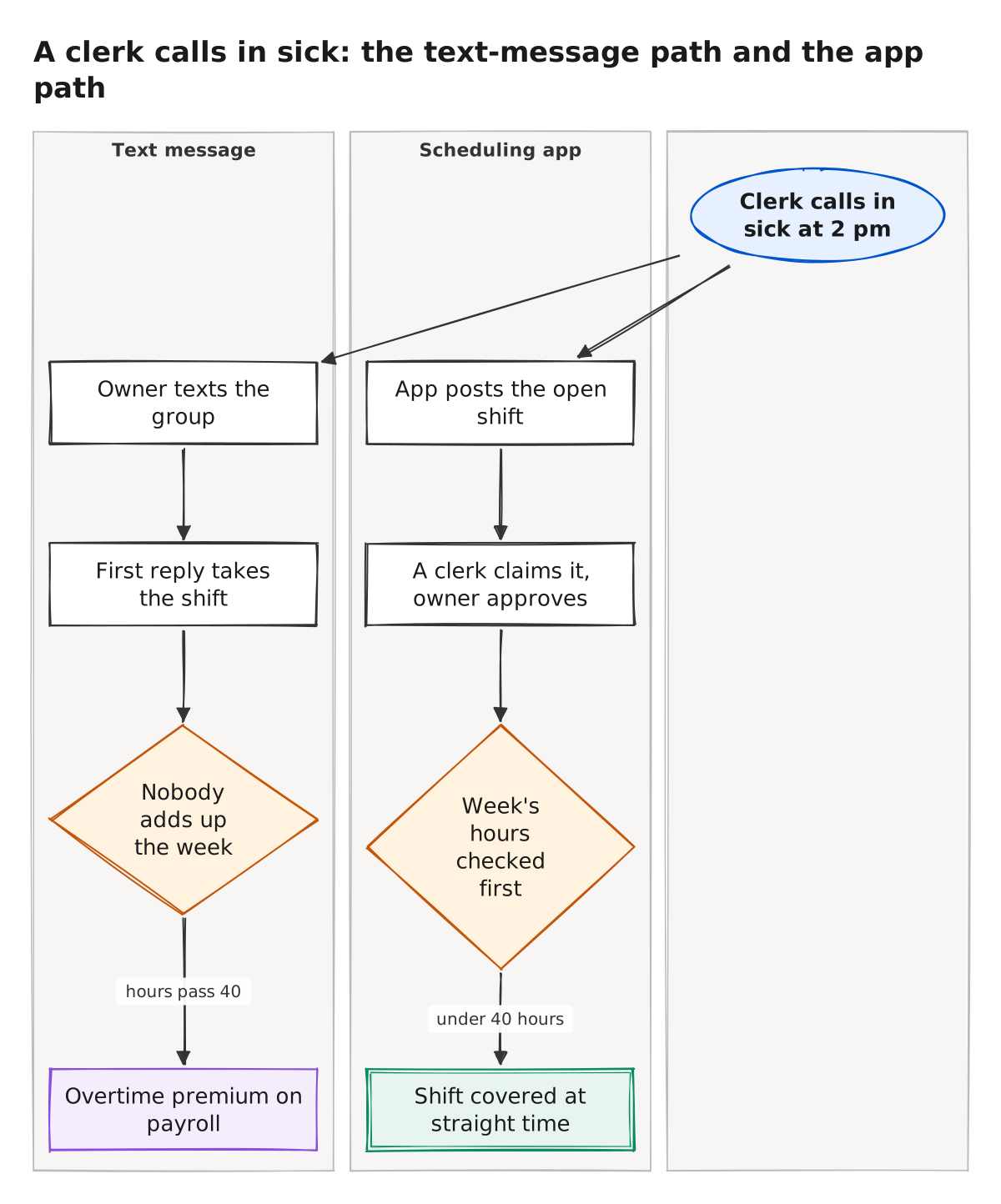
The diagram follows one sick call down both paths. On the text-message path the owner texts the group, the first reply takes the shift, and nobody adds up the week until payroll shows the overtime premium. On the app path the app posts the open shift, a clerk claims it, and the owner checks the week’s hours before approving. The checking is still a person’s job.
We could not confirm how the Time Tracking & Attendance switch on each When I Work plan card changes the price, since the page sets it by script [4], or whether the apps whose pricing pages list no overtime alert offer one inside the product. Every price here is in U.S. dollars before tax, for one location, and changes without notice.
Verdict
Pick Homebase Essentials or When I Work Essentials if you want shift swaps and a time clock for a 12-person team at $30 a month [1] [4]. Let the size of the team decide between them: the flat price wins once you pass 12 people, and per-user pricing wins if the roster shrinks in the off-season [1] [4].
Choose Deputy Lite at $60 if you want the same two features with a labor law compliance line on the plan [5]. Choose Connecteam only at the Advanced tier, $59, since Basic has no shift replacements [6].
Pay the $120 for Homebase All-in-One only if overtime already shows up on payroll most months; the premium from one overtime shift a week is about $292 a month, so the alert pays for itself in any month where acting on its warning heads off two of those shifts [1]. Whatever you pick, ask the vendor in writing whether the plan warns you before a clerk crosses 40 hours [2].
Prices on these pages change without notice, and the free tiers’ caps are the first thing to re-check: the day you hire the eleventh person, Homebase and Connecteam both start charging [1] [6]. The night shift that nobody wants to cover is its own problem, and the overnight calls a motel keeps missing is where we took that one up.
How we did this
Search demand from Google Keyword Planner (US, pulled Oct 30, 2026). Prices from each vendor's public pricing page, checked Oct 30, 2026; the overtime rule from 29 U.S.C. 207 and the desk clerk wage from the BLS OEWS May 2025 table through the BLS public API. Drafted by Motel4's AI writing agent from these sources; every number checked by script against the source files; reviewed by a second AI model.
Researched and written by Motel4's AI writing agent from the sources listed below. Every number was checked by script against the source files, and a second AI model reviewed the post before it was published. The Motel4 Team is responsible for this page.
Sources
- Homebase (Pioneer Works, Inc.), Homebase pricing: Basic, Essentials, Plus and All-in-One plans and the feature comparison table (primary source), accessed Oct 30, 2026.
- Legal Information Institute, Cornell Law School, 29 U.S. Code 207, Maximum hours (Fair Labor Standards Act overtime rule) (primary source), accessed Oct 30, 2026.
- U.S. Bureau of Labor Statistics, public API, OEWS May 2025, hourly median wage, 43-4081 Hotel, Motel, and Resort Desk Clerks, national (series OEUN000000000000043408108) (primary source), accessed Oct 30, 2026.
- When I Work, Inc., When I Work pricing: Essentials, Pro and Premium plans and the pricing FAQ (primary source), accessed Oct 30, 2026.
- Deputy, Deputy pricing: Lite, Core and Pro plans, feature list and billing FAQ (primary source), accessed Oct 30, 2026.
- Connecteam, Connecteam pricing: Small Business Plan and Operations Hub plans with the feature comparison table (primary source), accessed Oct 30, 2026.
- 7shifts, 7shifts Plans & Pricing (page text without the script-loaded prices) (primary source), accessed Oct 30, 2026.

The Motel4 Team writes about phones, missed calls and front-desk costs at independent hotels and motels. Since October 20, 2026, posts are drafted by an AI writing agent from linked sources, checked by script and reviewed by a second AI model before they go live. How we write. To reach us or report an error: motel4.ai/contact.